Dashboard
Your home base — search, filter, sort, and manage all your documents and folders.
Dashboard
The dashboard is your home base. It shows one workspace's documents at a time — the workspace switcher decides whose — with tools for searching, filtering, and managing your review workflow.
Layout
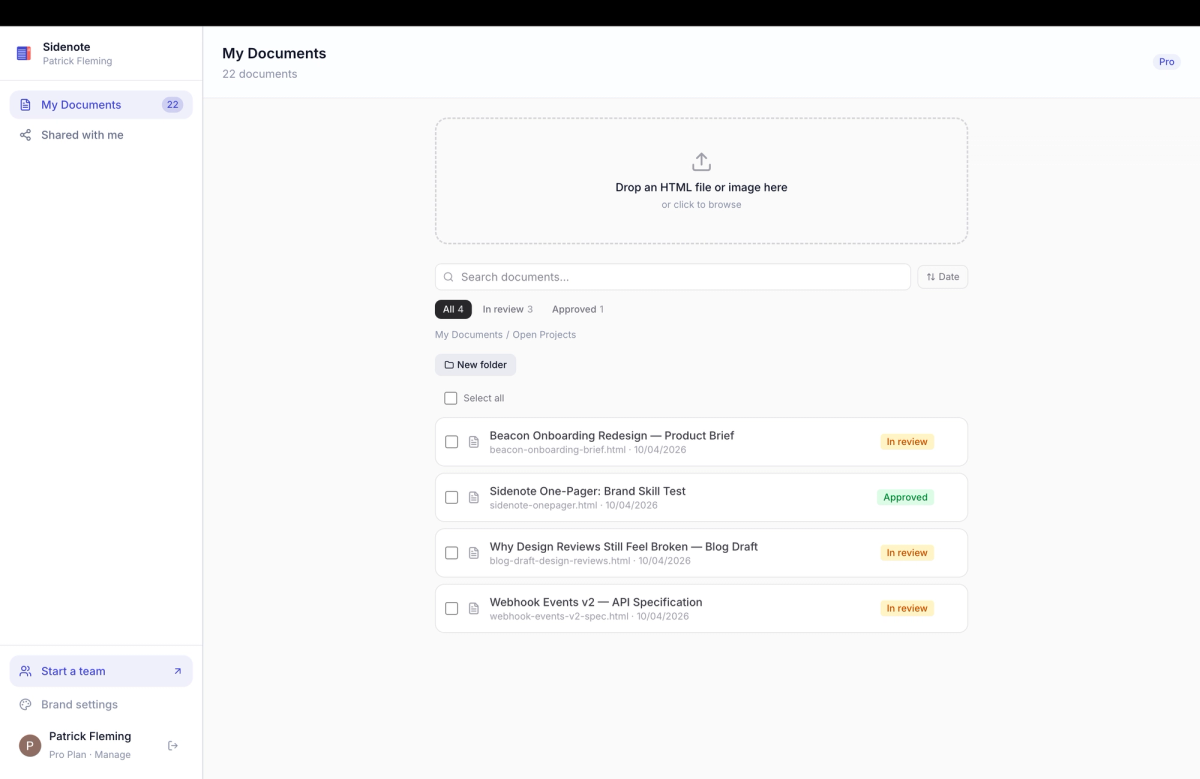
The dashboard has a sidebar on the left and a document list on the right.
At the top of the sidebar sits the workspace switcher: your own workspace, named after you, plus one for each team you belong to. Below it the navigation is identical in every workspace: Documents (the active workspace's list), Shared with me (documents others have shared with you), and Brands. Personal folders and account links follow.
Document list
Documents are displayed with their title, status badge, annotation count, and last-updated date. Click any document to open it in the review page.
Searching
The search bar at the top of the document list filters by title in real time. Start typing to narrow down results.
Filtering by status
Use the status dropdown to filter documents by their current state: All, Draft, In Review, Approved, or Archived. The default view shows all non-archived documents.
Locked documents
In a team workspace, rows you have locked carry a lock icon — only you can see those documents. A Locked chip appears beside the filters whenever locked rows exist, narrowing the list to them. Locking and unlocking happens from the review toolbar, or in bulk with Make private.
Sorting
Toggle between two sort modes using the sort button:
Most recent (default) — documents ordered by last update, newest first.
Alphabetical — documents ordered by title, A to Z.
Bulk actions
Select multiple documents using the checkboxes. Hold Shift and click to select a range. With documents selected, you can bulk delete or archive them in one action. In a team workspace you can also choose Make private, which locks the selected documents you created so only you can see them.
Document menu
Each document has a ⋯ menu with quick actions: open, move to folder, change status, archive, or delete. This is the fastest way to manage individual documents without opening them.
Your account
The bottom of the sidebar shows your profile (name and avatar from Google), your current plan, and links to manage your subscription or sign out.
{
  "view": "dashboard",
  "workspace": "the switcher decides",
  "sections": ["Documents", "Shared with me", "Brands"],
  "filters": ["status", "locked", "search", "sort"],
  "bulkActions": ["archive", "delete", "make private"]
}